Paste messy AI text.
Get clean writing.
Beak tidies text from ChatGPT, Claude and the web the moment you paste it. No stray ** or ##, no broken lines, and no account. Then copy it anywhere in one click.
Works with text from
Product names and logos belong to their owners. Beak is not made by or connected with them.
Smart paste
You asked AI for help. It gave you homework.
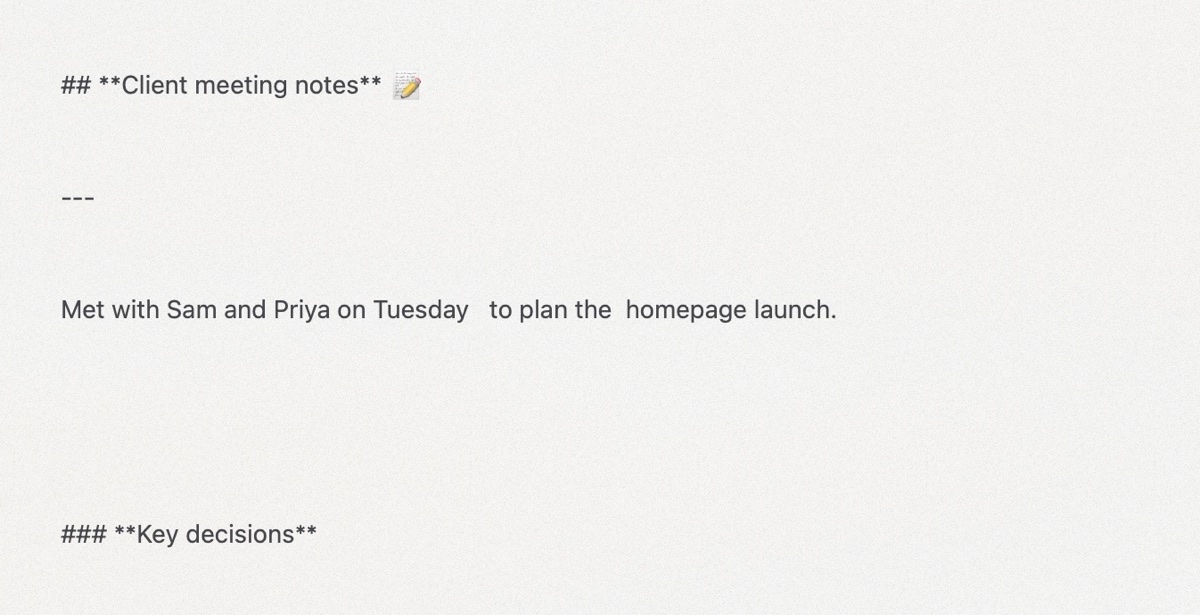
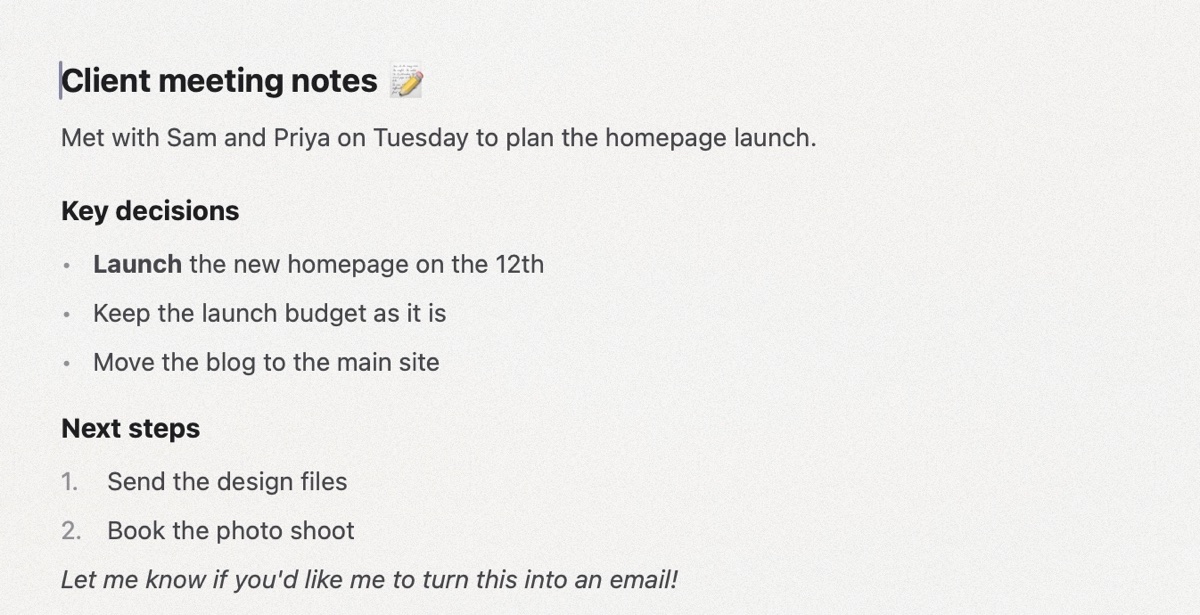
AI answers look fine in the chat, then fall apart when you paste them somewhere else. Beak cleans them as they arrive, so you keep the headings, lists and bold, and lose the mess.
Features
Everyday writing, without the clean-up.
Beak does a few things, and does them carefully.
Auto Clean
Copy it clean. Paste it anywhere.
One click copies a clean version of the whole document, ready for an email, a form or another app. Your document stays as it is.
- Plain text for messages, forms and social posts
- Markdown for GitHub, Notion and Obsidian Pro
- Rich text for Mail, Pages, Word and Google Docs Pro
Shortcut: ⇧⌘C
Simple formatting
Type / for everything else.
Type / on an empty line to insert a heading, list, quote, table or emoji. If you know Markdown, # and - work as you type.
- Real tables, with Tab to move between cells
- Fonts, sizes, colours and line height in one small bar
- Paste Without Cleanup when you want the text as it was
Library
All your writing, in one place.
Documents live in a sidebar, grouped in folders. Search by title or text, drag to move, and click a title to rename it.
- Saves automatically, so there is no Save button
- Deleted documents go to the Trash first
- Import Word, Markdown, RTF, HTML and text files
Pages and export
Ready to print, when you need it.
Write on one long page. When it is time to share, export a copy in the format people expect.
- Export to PDF, Markdown and plain text
- Pages view, to see your document as printed paper Pro
- Word (.docx), Rich Text, OpenDocument and HTML, and printing with the paper size you see on screen Pro
Make it yours
Calm by default. Colour if you like.
Lilac, in soft indigo, lilac and almond, is the default. Slate is a calm blue-grey, and Match System follows your Mac's accent colour. Choose how much colour you see around the page, from none at all to a little more. Light and Dark Mode are both built in.
- Five more colour themes: Aurora, Ember, Lagoon, Dusk and Graphite Pro
Focus sounds
Writing timer
Focus sounds
Sounds to write to. Built in.
Play light rain, a café, a campfire or brown noise while you write. The sounds come from SoundLax, my sound app, and loop quietly with no gaps. They work offline too.
- A 25, 45 or 60 minute writing timer, with a soft chime at the end
- The time left shows at the bottom of the window
- Start Writing, Play and Stop actions for the Shortcuts app
And the details
Small things, done right.
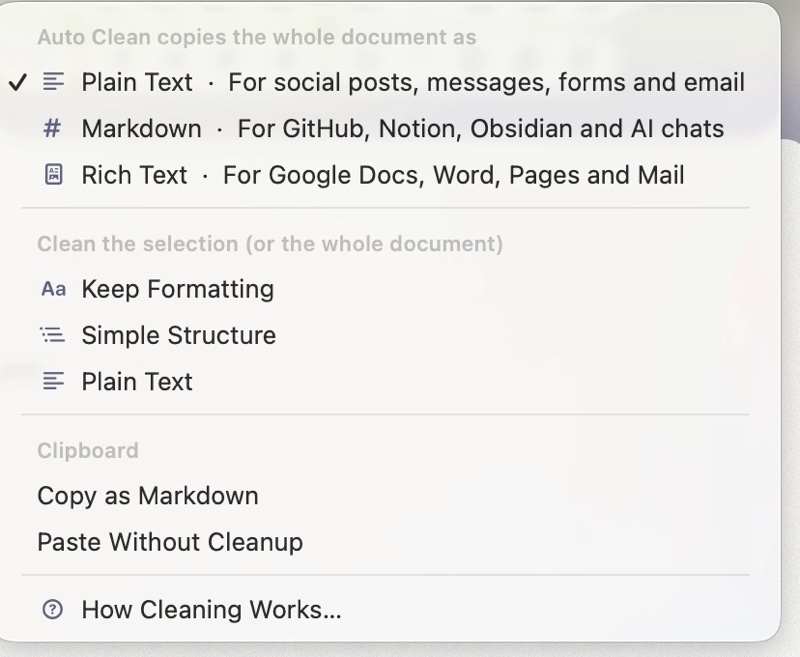
Three ways to clean
Keep Formatting keeps headings, lists, links and tables. Simple Structure keeps only headings and lists. Plain Text keeps just the words. Pick a default once in Settings, or clean any selection from Cleaning Options.
Undo is always there
Changed your mind after a paste? ⌘Z brings back the text exactly as you copied it.
Real tables
Markdown tables from AI chats become proper tables you can edit, with header rows and soft grey lines.
Clean the clipboard Pro
The menu bar item cleans whatever you copied, from any app, with ⌃⌥⌘V.
Opens your files too
Open Word, Markdown, RTF, OpenDocument and text files from Finder, and save them in place.
Easy on the eyes
A comfortable reading width, a soft page shadow and Dark Mode for late nights.
Made for Mac
A native app with real menus, keyboard shortcuts and Liquid Glass on macOS 26. It opens fast and stays out of your way.
Compare
Beak vs pasting into TextEdit.
TextEdit is a fine app. It just was not made for AI text.
| What happens when you paste | TextEdit | Beak |
|---|---|---|
| Turns ** and ## into real bold and headings | No | Yes |
| Fixes broken lines and extra spaces | No | Yes |
| Keeps lists and tables | Sometimes | Yes |
| Copies a clean version in one click | No | Yes |
| Library with folders and search | No | Yes |
| Works offline | Yes | Yes |
| Price | Free, built in | Free, Pro optional |
Private by design
Small app. Careful with your words.
Why it is called Beak
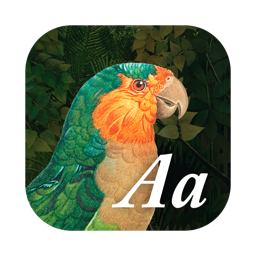
The bird on the icon is a parrot from an old engraving, set in a painted jungle. Parrots use their strong, curved beaks to pick through whatever they find and keep only what they need. Beak does the same with messy text. It keeps your words and drops the stray symbols, broken lines and odd spacing.
I am Ben, a designer in Auckland. I made Beak because I kept fixing AI answers by hand before I could use them. Now I paste, and get back to work. I hope it saves you the same small, annoying minutes.
More from →Pricing
Beak is free. Really.
Everything most people need is in the free version, with no time limit, no account and no ads. Beak Pro is an optional extra for people who clean text all day.
What most people need
Beak
Free
Free to download and free to keep using. No account, no ads, no subscription and no time limit.
- Smart paste with three ways to clean
- Unlimited documents and folders, with search and Trash
- Tables, slash menu and Markdown shortcuts
- Auto Clean: copy the whole document as clean text
- Export to PDF, Markdown and plain text
- Focus sounds and a writing timer
- Lilac, Slate and Match System themes, Light and Dark Mode
- Free updates
Needs macOS 14 Sonoma or later.
Beak Pro Optional
US$1.99 one time
For people who clean text every day. Unlock it inside the app, any time. Family Sharing is on.
- Clean text in any app from the menu bar, with ⌃⌥⌘V
- Auto Clean as Markdown or rich text
- Export to Word, Rich Text, OpenDocument and HTML, and print
- Pages view
- Extra cleaning: remove emoji and replace em dashes
- Five more colour themes
- New Pro features in later versions
FAQ
Before you download.
Does Beak need the internet?
No. Beak works fully offline and never connects to the internet. Your documents stay on your Mac.
Which apps does it work with?
Any app you can copy text from: ChatGPT, Claude, Gemini, Copilot, web pages, emails and more. Beak reads what is on the clipboard, so there is nothing to connect or sign in to.
Will it change my words?
No. Beak only tidies the formatting: symbols, spacing, line breaks and leftover markup. If you want the original back, press ⌘Z straight after pasting, or use Paste Without Cleanup (⌥⌘V).
Can I use it with Word or Google Docs?
Yes. In the free version, Auto Clean copies plain text, which pastes cleanly anywhere. With Beak Pro, choose Rich Text to keep headings, lists and bold in Word, Pages, Mail or Google Docs, and export .docx files.
Is Beak really free?
Yes. The free version has no limits on documents, folders or cleaning, and no account, ads or subscription. Beak Pro is an optional one-time purchase of US$1.99 for the features marked Pro on this page.
Do I need SoundLax for the focus sounds?
No. Four sounds come with Beak and work offline. If you want more, SoundLax has many more sounds for focus, relaxing and sleep, and Beak can open it on the same sound.
Is there an iPhone or iPad version?
Not yet. Beak is a Mac app for now. Sync between devices is on the list for a future version.
What does Beak collect about me?
Nothing. There is no account, no analytics and no tracking. Read the privacy policy for the details.
Stop fixing AI text by hand.
Paste it into Beak, and get back to the part you actually care about.
Download Beak free